

With the increasing demand to connect various IoT devices simultaneously within homes, the latest wireless routers require fast wireless networks and efficient signal processing. Products featuring the wide bandwidth and processing speed of WIFI6, 2.5G wired gigabit ports, and various additional functions are gaining attention.
As more users utilize media servers like cloud services or DLNA, there is a growing need for routers that can meet these demands.
The product we are introducing today is the Netis MEX6000 AX6000 MESH WIFI6 Gigabit Wireless Internet Router. Let’s take a closer look at its features.
Specifications and Configuration


The Netis MEX6000 WIFI6 wireless router has the following specifications:
| Specification | Details |
|---|---|
| CPU | MT7986A 2GHz Quad-Core Processor |
| RAM | 512MB |
| Antenna | 8x High-Performance Antennas (4T4R) |
| Wireless Standard | Supports Wi-Fi 6 (802.11ax) |
| Frequency Bands | Dual Band: 2.4GHz & 5GHz |
| Wired Ports | 1 x 2.5G Gigabit Port, 3 x 1G Gigabit Ports |
| USB Port | 1 x USB 3.0 Port |
| MESH Support | Supports MESH networking with up to 15 devices |

The product package includes the Netis MEX6000 main unit, a power adapter, a LAN cable, and a user manual.
Appearance and Features


Unlike typical rectangular routers, the Netis MEX6000 boasts a unique and sleek design. Its black, satellite-like design complements any gaming desk setup.

The front features LED indicators that display the router’s status, allowing users to easily check the power, internet, USB, MESH, and WIFI status at a glance.

The Netis MEX6000 supports MESH functionality, with the MESH button located at the bottom front of the router. This button allows for easy MESH connection of multiple routers.
The MESH function of the Netis MEX6000 has the following features: it combines multiple routers into a single network, providing a seamless internet environment without dead zones.
Smart Roaming: Automatically switches to the router with the strongest signal as the user moves.
Self-Healing: Automatically recovers in case of network issues.
Channel Optimization: Automatically selects the optimal channel based on the surrounding environment.
Space Optimization: Optimizes signals according to the space for wider coverage.


The rear is equipped with various ports, including a USB 3.0 port, a 2.5G WAN port, one 2.5G gigabit port, three 1G gigabit ports, a power connector, and a power button.
While 1Gbps wired LAN is commonly used in home and office network environments, the Netis MEX6000 supports a 2.5Gbps Ethernet port, offering speeds up to 2.5 times faster than traditional gigabit networks.
Additionally, the USB 3.0 port on the far left allows for the connection of external hard drives or SSDs, enabling use as a simple NAS.

The bottom is designed with ventilation holes to dissipate heat, helping maintain stable performance even during extended use.

The reset button is located at the bottom of the router and is used to initialize the router.
Installation and Setup


The Netis MEX6000 not only features a unique design but also offers a simple installation process. After setting up the router, accessing 192.168.1.1 in an internet browser launches an automatic setup guide, completing the setup with just a few clicks.
Netis provides firmware developed in Korea and collaborates with the Korea Internet & Security Agency to enhance security. The admin UI is designed to be user-friendly, allowing easy configuration of various additional features.


The admin screen is organized into the following categories:
Home: Provides an overview of the router’s status, including internet connection status and the number of devices connected to the MESH.

Network: Allows configuration of guest networks, wireless extension mode, advanced settings, access control, AP search, and VPN settings.

The WISP function enables the router to receive internet signals wirelessly and share them with other devices. The Netis MEX6000 WIFI6 wireless router supports the WISP function, allowing wireless internet reception and distribution to other devices.

Advanced: Allows configuration of dynamic domain connection, remote access, diagnostic functions, port mirroring, WOL settings, and link information.

Dynamic Domain Name System (DDNS) allows access to network devices through a fixed domain name even in dynamic IP address environments. The Netis MEX6000 easily supports DDNS, enabling access to NAS, CCTV, FTP servers, and more through the assigned address.


The external connection and WOL (Wake-on-LAN) function allow remote control and management of network devices or computers, making it easy to control and manage equipment at home or in the office from outside. Especially, remote access environments can be established through the previously explained DDNS and port forwarding settings.

Port Mirroring is a function for network management and monitoring, allowing network administrators to analyze traffic from specific ports in real-time and diagnose issues.

System: Allows management of passwords, time settings, initialization, scheduling, and firmware upgrades. It supports automatic firmware updates to keep the system up-to-date.

The Netis MEX6000 can use OpenWrt, a Linux-based open-source router firmware, allowing customization of network functions. OpenWrt firmware is known for its fast updates compared to existing manufacturers’ firmware, enhancing network management and security.
NAS Function


The Netis MEX6000 offers a simple NAS function. By connecting an external hard drive or DAS to the USB 3.0 port, you can easily use it as a NAS without complex settings.
SAMBA Configuration

SAMBA is a protocol that allows file sharing over a network on operating systems like Windows. You can activate the function in the NAS > SAMBA menu and specify a username and password.

To use SAMBA, you need to configure a few settings in Windows. First, access the Control Panel > Programs menu.

In the Programs and Features window, click Turn Windows features on or off on the left to call up the Windows Features popup, and check SMB 1.0/CIFS File Sharing Support to activate the feature.


After rebooting Windows, entering //192.168.1.1 in the address bar of Windows File Explorer allows access to the external storage device connected to the router, enabling file copying between your computer and NAS storage over the network.


On a smartphone, after connecting via Wi-Fi (on Android), you can access the NAS by launching the My Files app and navigating to Storage > Network Storage.
FTP Access


Activating the FTP server function allows access to the NAS from outside. You can activate the function in the NAS > FTP Server menu and access it through an external IP or dynamic domain name.
DLNA Configuration


DLNA allows streaming of videos stored on the NAS to smart TVs or smartphones. By activating the function in the NAS > DLNA menu, you can play videos directly on smartphones or TVs.
Speed Test

The Netis MEX6000 boasts the fast speeds of WIFI6, supporting up to 4.8Gbps on the 5GHz band and up to 1.2Gbps on the 2.4GHz band.


In actual tests, it showed stable speeds in a gigalite internet environment. Using the MESH function allows connecting multiple routers for wider coverage and stable connections.
In Conclusion
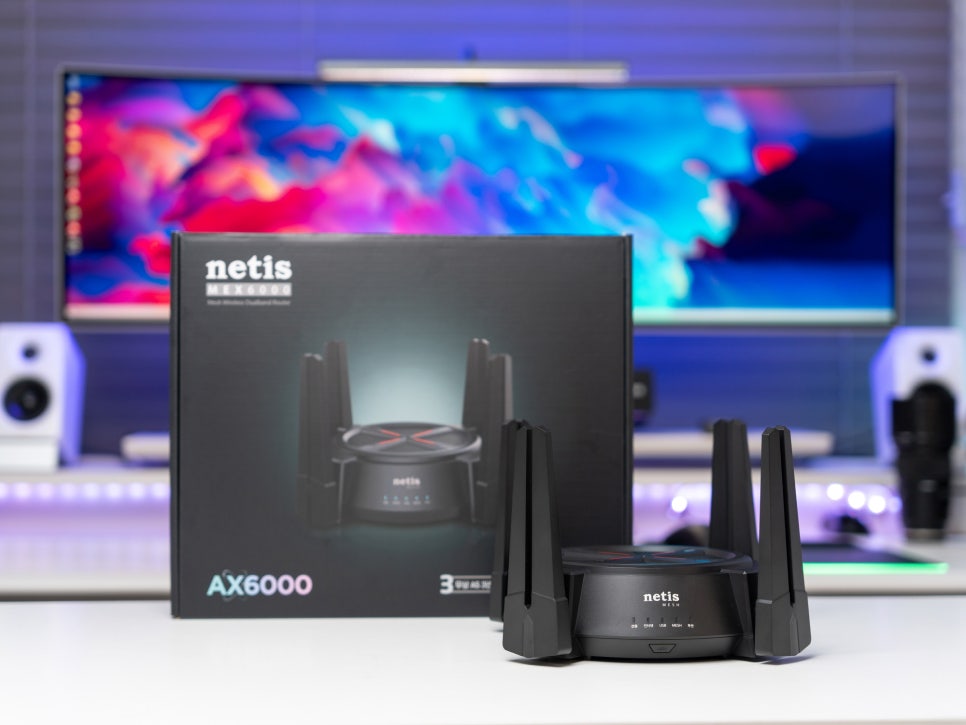
The Netis MEX6000 WIFI6 wireless router offers wide coverage through the fast speeds of WIFI6 and MESH functionality, and enables various file sharing and media streaming through its simple NAS function. Especially, it uses firmware developed in Korea, providing excellent security and a user-friendly interface that anyone can easily set up and use.
Supporting a 2.5Gbps Ethernet port, it offers speeds up to 2.5 times faster than traditional gigabit, allowing smooth high-resolution streaming or cloud gaming, and the USB 3.0 port can be used to configure a simple NAS (network storage) system. Additionally, it can use OpenWrt, a Linux-based open-source router firmware, to enhance network functions and security.
The Netis MEX6000 is suitable for users who want a stable and fast internet environment at home or in small offices, and is highly recommended for users utilizing various IoT devices and media servers.
This concludes the review of the domestically developed firmware WIFI6 router recommendation, the Netis MEX6000 AX6000 MESH Gigabit WiFi.