

The gaming monitor market has recently seen a significant increase in demand for high refresh rate monitors. These monitors offer smoother motion and faster response times, providing a substantial advantage in games that require quick reflexes.
There are various sizes of high refresh rate monitors available, and among them, the 24-inch gaming monitor is ideal for games like FPS or RTS, where it’s beneficial to see the entire game screen at a glance.

Today, I would like to introduce the LG UltraGear 24GS60F, a high refresh rate 24-inch gaming monitor released by LG Electronics. The LG UltraGear brand is known for its high-performance gaming monitor lineup, offering products in various sizes and specifications that are well-loved by many gamers.
Specifications and Design

Product Specifications
Screen Size: 60.5cm (24 inches)
Resolution: FHD (1920×1080)
Panel Type: IPS
Refresh Rate: 180Hz
Response Time: 1ms (GTG)
Color Gamut: sRGB 99%
Brightness: 300 cd/m²
Contrast Ratio: 1000:1

The LG UltraGear 24GS60F features an FHD IPS panel with a high refresh rate of 180Hz and a fast response time of 1ms (GTG), along with excellent color reproduction (sRGB 99%). The panel adopts a 3-sided slim bezel design for an immersive experience.

The LG UltraGear 24GS60F is compatible with NVIDIA’s G-Sync technology, which synchronizes the monitor’s refresh rate with the graphics card’s frame output to eliminate screen tearing and stuttering, enabling smooth gameplay.

The monitor’s lower stand is designed with space efficiency in mind, minimizing its footprint on your desk.


The back of the monitor features logos symbolizing the LG and UltraGear brands.

The back is perforated, and although the power consumption is a maximum of 19W, which means heat isn’t a concern, it should still be beneficial for extended use.

The IO port configuration includes, from the top, 1 DisplayPort 1.4, 2 HDMI 2.0 ports, a headphone jack, and a power port, with a dedicated adapter provided.
Installation and Testing


After connecting the monitor, you can check the 180Hz refresh rate and G-Sync compatibility information in the Windows display settings or NVIDIA control panel.


The LG UltraGear 24GS60F uses an IPS panel to provide excellent color reproduction and wide viewing angles. It supports sRGB 99% (Typ.) and HDR10, meaning the display faithfully reproduces 99% of the sRGB color space in typical environments.


The IPS panel has a viewing angle of about 178 degrees, meaning there is little to no color distortion or brightness change when viewed from any angle, enhancing immersion not only in games but also when watching movies or animations.

The LG 24GS60F, with its 180Hz high refresh rate, offers significant advantages in FPS, RTS, racing, and rhythm games. The high refresh rate allows for smoother game visuals, enabling precise aiming and quick reactions.

The LG 24GS60F supports various game modes, befitting a gaming monitor. You can activate the OSD menu and adjust various settings using the joystick button located at the bottom of the monitor. The OSD menu is intuitively designed, making it easy for anyone to configure.


The 24-inch gaming monitor LG UltraGear 24GS60F offers various game mode presets, including two user presets, FPS, RTS, vivid video, reading mode, and HDR.

In the game adjustment mode, you can activate the Adaptive-Sync feature. Adaptive Sync synchronizes the refresh rate between the monitor and graphics card, reducing screen tearing, stuttering, and input lag. Activating this feature allows for smoother enjoyment of games, videos, or animations.

Adaptive Sync broadly includes AMD FreeSync and NVIDIA G-Sync Compatible. The LG UltraGear 24GS60F supports both technologies, providing optimal display performance with both NVIDIA RTX and AMD Radeon graphics cards.

The Black Stabilizer function enhances visibility in dark areas, making it easier to spot enemies in dark scenes.

The response time can be adjusted in four stages, allowing optimization according to the game genre. To apply the fastest 1ms (GtG) response time, you need to select the very fast mode.

The crosshair option displays a reticle on the monitor, which can be set in four different designs (colors).


Finally, the FPS counter is a feature that allows you to check the current game’s frame rate directly on the monitor without running a separate program.
User Experience
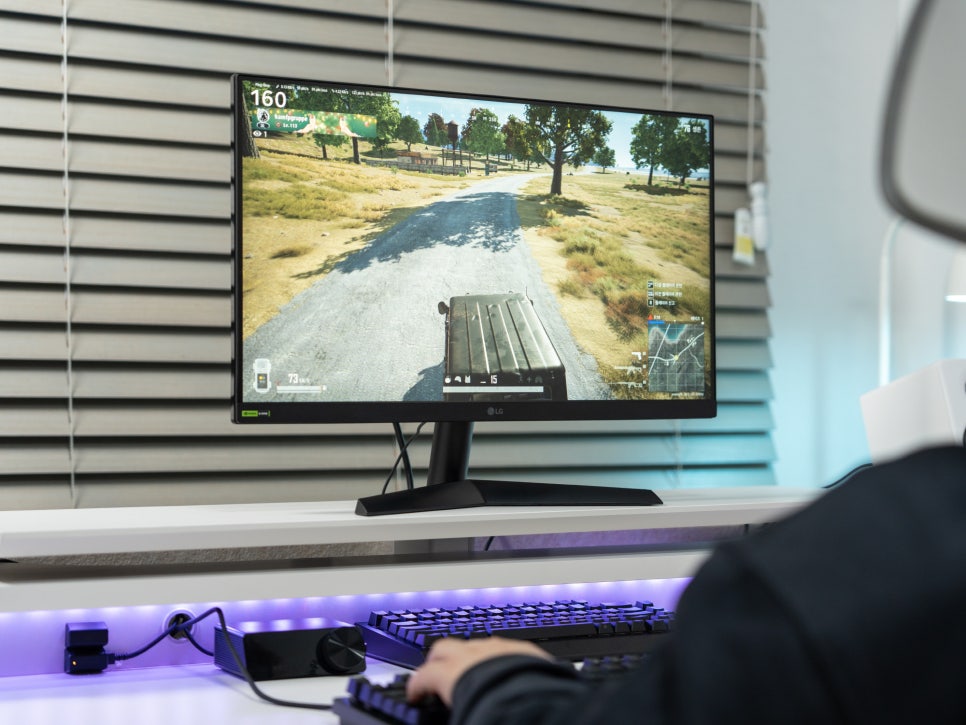
The 24-inch size of the 24GS60F makes it easy to see the entire game screen at a glance in FPS or RTS games.

It is particularly specialized for FPS and RTS genres like Battlegrounds or League of Legends, where the 180Hz high refresh rate and fast response time allow for smooth transitions and quick aiming in-game.

Personally, I find the Black Stabilizer very useful. It’s one of the technologies provided by the LG UltraGear 24-inch gaming monitor that adjusts the contrast to better see details in dark screens.

The Black Stabilizer technology increases the brightness of shadowy areas or dark parts of the game screen, as shown above, while maintaining the brightness of bright areas, allowing you to easily spot enemies hiding in shadows or corners without worrying about overexposure.
The intensity of the Black Stabilizer can be finely adjusted in 20 steps from 0 to 100 according to user preference.
Conclusion

The LG Electronics 24-inch gaming monitor UltraGear 24GS60F features a 180Hz high refresh rate, 1ms fast response time, excellent color reproduction and wide viewing angles of the IPS panel, G-Sync compatibility to prevent screen tearing, various gaming optimization features, and a 24-inch size that provides a suitable view for FPS or RTS genres, with a 3-sided slim bezel design for excellent immersion.

As a product of LG’s gaming gear brand UltraGear, it is praised for its excellent performance at a reasonable price, offering great value for money. It is highly recommended for those who enjoy games like League of Legends, Valorant, and Battlegrounds.
As an Amazon Associate I earn from qualifying purchases.
Purchase on Amazon : https://a.co/d/aben6ox
