

Razer is a global brand specializing in gaming gear, particularly known for its innovative technology and design in keyboards. The RAZER BlackWidow V4 Pro, the latest in the BlackWidow series, is a flagship wireless gaming keyboard featuring a 4000Hz polling rate wireless connection, Bluetooth 5.1, and hot-swappable switches. It offers a variety of functions, especially with its combination of an OLED display and a command dial. Let’s explore the performance, features, and user experience of the Razer BlackWidow V4 Pro to understand why it is garnering attention.
Specifications and Components


As a flagship wireless gaming keyboard, the RAZER BlackWidow V4 Pro supports a variety of the latest features and comes with the following key specifications:
Product Specifications
Model Name: RAZER BlackWidow V4 Pro
Layout: 75% with F-row and arrow keys
Connection: Razer HyperSpeed Wireless (2.4GHz), Wired, Bluetooth 5.1
Switch: Razer 3rd Gen Orange Mechanical Switch (Tactile)
Simultaneous Input: Unlimited
Keycaps: Double-shot PBT Keycaps
Lighting: Razer Chroma RGB
Onboard Memory: Hybrid onboard memory for up to 6 profiles
Display: 2-inch OLED Display
Size/Weight: 329 x 160 x 40mm / 984g
Warranty: 2 years


The package includes the keyboard itself, a premium detachable palm rest, a USB Type-C to A cable, a 2.4GHz wireless dongle, a keycap/switch puller, and a manual. The included components provide a luxurious impression.
Design and Features


The Razer BlackWidow V4 Pro exudes luxury and sturdiness at first glance. The aluminum top plate enhances durability, and despite its compact 75% layout, the 984g weight ensures stability during typing without shaking.

It supports Razer HyperSpeed 2.4G wireless connection, wired connection, and Bluetooth 5.1, allowing for versatile use in different environments. Mode changes can be made using the toggle button located at the back.


At the top, there is a 2-inch OLED display and a dial next to it. Using the Razer Synapse 4 software, you can change the information displayed on the screen or assign functions like volume control or screen brightness to the dial button for easy operation.


The bottom of the keyboard features four anti-slip pads, and the height adjustment stand can be set to three levels: 0 degrees, 6 degrees, and 9 degrees.


Additionally, the detachable palm rest attaches magnetically and helps reduce wrist fatigue during extended use.
75% Layout

As indicated by its model name, the Razer BlackWidow V4 Pro 75% adopts a 75% layout, which is a mid-size between a full-size keyboard and a tenkeyless (TKL) keyboard. It offers most essential keys while maintaining a compact layout, making it popular among gamers.


The 75% layout efficiently places all necessary keys within easy reach, minimizing hand movement during typing. The close spacing between the F keys and the right arrow keys allows for quick response times and fast-paced typing.
Keycaps and Switches

The keycaps of the Razer BlackWidow V4 Pro are made from double-shot PBT material, which is resistant to wear and fingerprints even after prolonged use. The transparent lettering on the keycaps allows the RGB lighting to shine through subtly, enhancing the visual appeal.


The Razer BlackWidow V4 PRO supports hot-swappable switches, and it uses tactile-style Razer 3rd Gen Orange Mechanical Switches. Tactile switches provide a satisfying typing feel and precise input feedback, making them one of the best switch types for gaming.
Typing Sound

The Razer 3rd Gen Orange Switches produce a moderate typing sound and feel, unlike clicky switches. They offer a distinct tactile feedback that makes typing enjoyable, sitting between clicky and linear switches.
Personally, I prefer this level of lively sound. While it might be a bit distracting in an office or classroom setting, the sound provides clear feedback in a gaming environment. The FR4 plate with Poron gaskets, two layers of sound-dampening foam, and stabilizers without reinforcement contribute to a balanced typing feel and sound.
RGB Effects

The BlackWidow V4 Pro supports Razer Chroma RGB, allowing for 16.8 million color combinations and various effects. The combination of the OLED display, dial, and side RGB light strip with RGB lighting creates a dazzling yet sophisticated atmosphere.

Through the Razer Synapse 4 software, you can finely customize RGB effects, enabling lighting changes based on in-game situations or synchronization with music, providing a dynamic experience. The intense RGB effects enhance immersion in gaming, offering exceptional visual enjoyment.

The additional RGB light strip on the side reflects the RGB lighting onto the desk and surrounding environment, providing even more spectacular visual effects.
OLED Display
One of the standout features of the BlackWidow V4 Pro is the OLED display located at the top. This display can show custom animations, allowing you to express your personality. From simple images to dynamic animations, you can freely configure it using the Razer Synapse 4 software.


The OLED display can show real-time information during games or display custom images, enhancing gaming convenience by showing scores or skill cooldown timers, making it particularly useful for gamers.
Razer Synapse 4


Razer Synapse 4 is the software that controls all the features of the BlackWidow V4 Pro, allowing intuitive adjustments of key mapping, macro settings, RGB lighting customization, and OLED display settings.

The macro function in Synapse 4 is particularly useful for gamers, allowing you to program specific key combinations to simplify complex inputs. The profile saving feature lets you create multiple profiles and switch between them quickly, making it easy to transition between work and gaming environments.
Conclusion

The Razer BlackWidow V4 Pro 75% wireless gaming keyboard is an advanced model of the existing BlackWidow V4 75%, incorporating Razer’s latest technologies such as a 2-inch OLED display, Razer HyperSpeed, and 4KH polling rate. The hot-swappable switch design makes maintenance easier, and the tactile Razer 3rd Gen Orange Switches provide distinct feedback with precise and fast input.
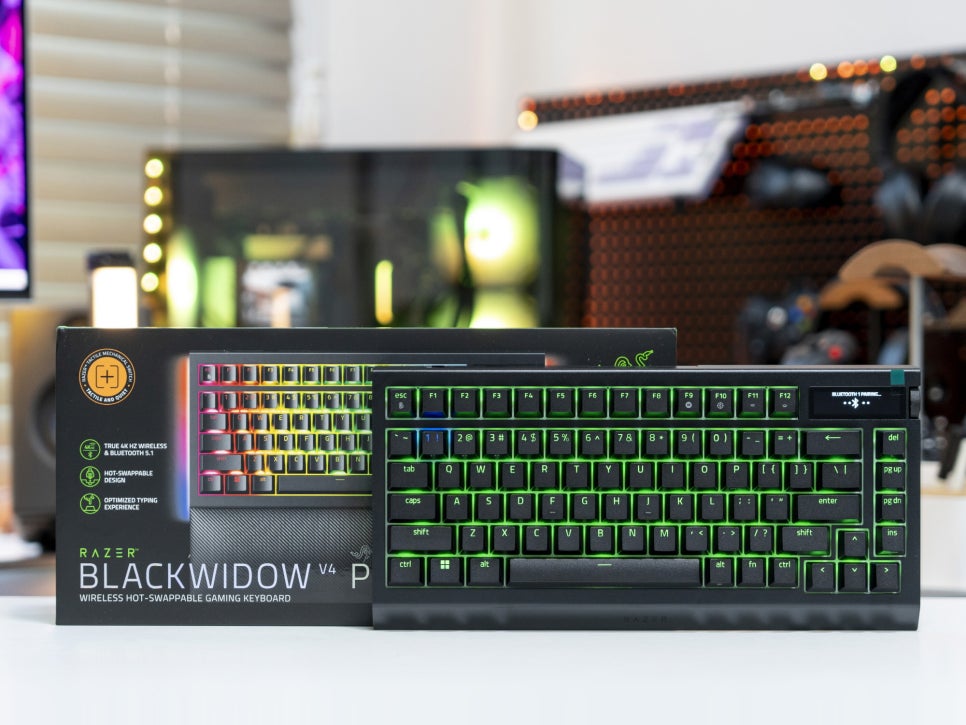
The 2-inch OLED display, side dial, and Razer Synapse 4 software allow you to display GIF animations, system information, keyboard status, and adjust keyboard lighting brightness, polling rate settings, and power-saving modes. Although the high price may be a concern, the BlackWidow V4 Pro offers value with its combination of the latest hardware and software. For users seeking an exceptional gaming experience and customization, this keyboard is an excellent choice.
This concludes the review of the evolution of the perfect wireless gaming keyboard, the RAZER BlackWidow V4 Pro 75%.
As an Amazon Associate I earn from qualifying purchases.
Purchase on Amazon : https://amzn.to/3TxUI01
